
Precode Labs

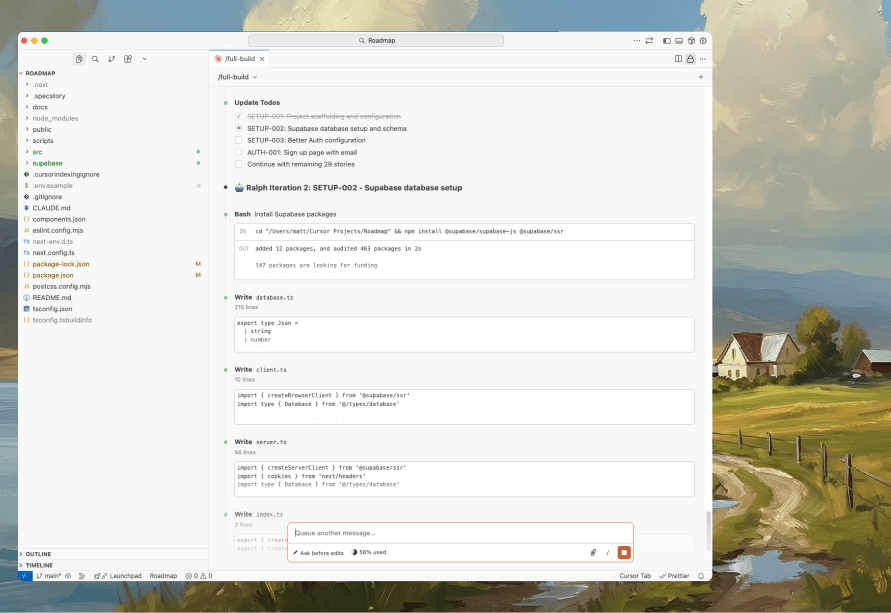
Supercharge your Claude Code
27 slash commands, 16 specialist agents, and Ralph autonomous builder all pre-configured and ready to use.

Design faster, smarter, better
Premium production-ready UI/UX resources for designers crafting superduper digital experiences.
The 52-Week Product Challenge
Building, shipping, and learning - one launch at a time

Thirdmap
Style maps with natural language and extract brand colours from any URL
We got tired of paying rent on our own maps.
Every time I needed a custom map - for a client project, a dashboard, a landing page - I hit the same wall. Mapbox Studio is powerful but expensive. Google Maps is locked down. Raw MapLibre is brilliant but feels like doing surgery with a butter knife.
The middle ground didn't exist. So I built it.
The problem isn't the tools. It's the business model.
Map platforms want you dependent. Monthly fees. API calls. Vendor lock-in dressed up as 'convenience'. You design something beautiful, then you're stuck paying forever to use it.
That felt backwards.
What if you just owned the output?
Thirdmap lets you style a map with AI - describe what you want in plain English. Extract brand colours from any URL. Then export the code and walk away.
No subscription. No API keys required to use your own map. Just a JSON file you can host anywhere.
The contrarian bit? I don't want recurring revenue from your map. I want you to export it and forget I exist.
That's the product.

Muthur
Muthur is a fleet management platform for autonomous AI outreach agents.
We've spent two decades building products. Twenty years of shipping code, designing interfaces, and watching 25 million people use things we made.
But here's the dirty secret: we still had to do our own outreach. Every. Single. Day.
LinkedIn messages. Cold emails. Follow-ups. The grind never stops, especially when you're bootstrapped.
We tried the tools. They all got us banned. Browser extensions share your fingerprint across accounts. One ban cascades to everything. It's a house of cards.
So we built Muthur.
Not another automation tool. A fleet. Each agent runs on its own dedicated infrastructure. Its own identity. Its own 90-day warming protocol that mimics how actual humans behave.
Here's the contrarian bit: patience beats speed in outreach. Everyone wants to blast 500 messages on day one. That's how you get banned. We built the patient approach because shortcuts are expensive.
103,000 lines of TypeScript. 132 API endpoints. Built in three days with AI.
The simple truth? We wanted our time back. Now we have it.
And so can you.

Macroflow
MacroFlow is a hybrid macro automation platform for macOS that bridges desktop and browser automation.
I watched a colleague spend 45 minutes fixing a broken automation. The website had changed a CSS class name. That's it. One class name, and the whole workflow died.
This happens constantly. You record a macro. It works beautifully. Then some developer pushes a UI update and everything breaks. You fix it. It breaks again. Rinse, repeat, forever.
That's when I started building MacroFlow.
The real problem nobody talks about
Most automation tools make you choose. Desktop OR browser. Never both.
But real work doesn't respect those boundaries. You copy data from a spreadsheet, paste it into a web form, switch back to confirm, then trigger an export. One workflow, two environments, and most tools just shrug.
So we built something different. MacroFlow records native macOS interactions and Chrome browser actions in a single timeline. One macro, both worlds.
The contrarian bit
Everyone's slapping "AI-powered" on their automation tools. We didn't.
Our self-healing uses simple weighted scoring. ID match gets 40%, text content 30%, aria-label 20%, class similarity 10%. When a selector breaks, we scan the page and find the best match. No machine learning. No cloud calls. Just maths.
It catches 70%+ of breakages automatically. Simple beats clever.
What we actually built
A hybrid macro recorder for macOS. Records desktop and browser together. Self-heals when websites change. Triggers from Stream Deck buttons, hotkeys, or app focus.
Record your workflow in 30 seconds. Replay it forever. Stop fixing broken selectors.
That's it. That's the whole thing.

Roast
Roast is a feedback intelligence platform that helps product teams capture both praise and criticism through gamified widgets with video recording and AI analytics.
Every feedback form I've ever used is broken.
Users either give you generic praise that sounds nice but teaches you nothing. Or they send angry emails that don't explain what's actually wrong.
I've been building products for over two decades. 25 million people have used things I've made. And the hardest part was never the code. It was understanding what users actually meant.
"The app is confusing." Thanks. Super helpful.
So I built Roast.
Here's the contrarian bit: most feedback tools are designed to make users feel good about giving feedback. That's backwards. They should be designed to make users feel good about being honest.
The Heat Slider lets people rate their frustration from "lukewarm" to "nuclear." It's a game. People enjoy it. And crucially, they tell you the truth.
Video recording with annotations means they can show you what's broken instead of describing it badly.
Same tool collects testimonials. Because sometimes people love your product. Capture that too.
That's it. Honest feedback. Full context. Both sides of the coin.
Turn user frustration into product gold.

PocketTunnel
PocketTunnel is the only mobile terminal app built for AI-assisted development. When Claude Code needs your input, you'll know instantly - wherever you are.
I was making a coffee when it happened. Again.
Claude Code had been working on a refactor for me. I stepped away for five minutes. Came back to find it had been waiting for my approval for twelve minutes. Just sitting there. Politely asking if it could proceed.
Twelve minutes of dead time because I wanted a flat white.
This kept happening
Pop to the loo. Claude waits. Answer the door for a delivery. Claude waits. Take a call in the garden. Claude waits.
The AI was doing the hard work. I was the bottleneck. And I had no idea it needed me until I walked back to my desk.
So I did what any frustrated developer does. I looked for a solution.
Nothing existed. Plenty of SSH apps. Plenty of terminal emulators. None of them knew what Claude Code was, let alone could tell me when it needed input.
The problem isn't terminal access
Here's what I realised: the mobile terminal apps we have were built for a different era. They assume you're SSH-ing into a server to tail logs or restart nginx. They don't understand modern development workflows where an AI assistant is doing 80% of the work and occasionally needs a human to say "yes, proceed" or "no, try something else".
The terminal isn't the hard part. Knowing when to look at it is.
So I built PocketTunnel
It's simple. A Mac agent watches your terminal sessions. A mobile app connects to them. When Claude Code is waiting for input, you get a push notification.
That's it.
No revolutionary AI. No blockchain. No "platform" with a roadmap full of features nobody asked for. Just a notification when your AI needs you, and a way to respond from your phone.
The contrarian bit
Everyone's building AI that replaces developers. I built something that makes developers better at working with AI. The future isn't AI coding alone. It's humans and AI in a tight loop, each doing what they're good at.
PocketTunnel keeps that loop tight, even when you're not at your desk.
Your terminal, in your pocket. That's all it is. That's all it needs to be.
Creme
Creme is a browser-based live coding music environment that lets musicians and coders create algorithmic, polyrhythmic music through simple code.
I wanted to make algorithmic music. The kind where you write code and patterns emerge. Polyrhythmic, generative, endlessly evolving stuff.
So I tried the tools everyone recommended. TidalCycles. SuperCollider. Sonic Pi. And Strudel.cc - which became my biggest inspiration.
Here's what happened with most tools: I spent more time configuring software than making music.
Install Haskell. Configure SuperDirt. Set up audio routing. Debug why nothing's making sound. Google error messages. Try a different version. Start over.
By the time I got sound coming out of my speakers, I'd forgotten what I wanted to create in the first place.
Strudel showed me what was possible - a browser-based approach that just worked. But I wanted to see if I could build my own take on it.
A 40-year itch
I've been into computers and dance music for over 40 years. This wasn't a business opportunity or a gap in the market. It was a question: could I build this with Claude Code?
No product launch planned. No SaaS ambitions. No monetisation strategy. Just pure curiosity and the joy of building something for its own sake.
The wrong assumption
Everyone assumes powerful tools need complex setups. That's nonsense.
The browser is already a sophisticated audio engine. Web Audio API handles synthesis, effects, sample playback. It's not some toy - it's the same technology powering professional web tools used by millions.
So why was I installing Haskell?
What I actually needed
I needed to open a tab and start typing code that makes music. Immediately. No config files. No terminal commands. No 'works on my machine' debugging sessions.
Write note('c3 e3 g3'), hear a chord. Add .delay(0.3), hear it echo. Change the pattern while it's playing. Instant feedback.
That's it. That's the whole product requirement.
The contrarian bit
Here's what I think: installation requirements are gatekeeping disguised as quality standards.
The live coding community is brilliant. The tools they've built are genuinely powerful. But every complex setup step filters out potential musicians. Every config file is a barrier.
We tell people 'anyone can make music with code' then hand them a Haskell installation guide.
What Creme actually is
Creme is a browser-based live coding music environment. 54 audio effects. FM synthesis. Pattern language for polyrhythms. AI assistant when you're stuck. Sub-150ms latency.
Zero installation.
You open it. You type code. You hear music. That's the entire onboarding.
The technical architecture is interesting - fire-and-forget audio, fraction-based timing, patterns-as-queries. But honestly, you don't need to care about any of that.
This was built purely for fun - a decades-long interest in electronic music meeting modern AI-assisted development. Sometimes the best projects are the ones with no business case at all.
Open a browser tab. Start typing.

Flyng
Flyng is a macOS menu bar application that implements Google's Quick Share protocol, enabling Android devices to send files to Macs wirelessly
I use a Pixel phone and a MacBook. Have done for years. And for years, I've been emailing files to myself like it's 2005.
Think about how absurd that is. Two devices, sitting on the same desk, connected to the same wifi, and the fastest way to get a photo from one to the other is to bounce it off a server in Virginia.
Apple users have AirDrop. Android users have Quick Share. But if you're in both camps? You get nothing. You get cables that barely work. You get cloud sync that eats your storage. You get web apps that require you to open a browser on both devices like some kind of ritual.
Here's what bothered me most: the protocol already exists. Google's Quick Share is brilliant. It's fast, encrypted, and built into every Android phone. It just doesn't talk to Macs.
So I made it talk to Macs.
The contrarian bit
Everyone assumes Apple and Google will eventually fix this. They won't. Cross-platform interoperability isn't a bug they're working on. It's a feature they're avoiding. Keeping you in the ecosystem is the point.
Which means if you want tools that work across both, you have to build them yourself.
What I actually built
Flyng is a menu bar app. That's it. It implements the Quick Share protocol so your Mac appears as a target when you tap Share on Android.
One tap to send. One click to accept. File lands in Downloads. End-to-end encrypted. Never touches the cloud.
I built the first version in 5 days. Not because I'm fast, but because the scope was tiny. Receive files from Android. Do it securely. Stay out of the way.
No account creation. No Android app to install. No settings to configure. Your Mac just appears in the share sheet like it always should have.
Why this matters
It's not about the app. It's about the principle.
Your devices should talk to each other. The technology exists. The protocols are public. The only thing stopping it is corporate strategy.
Flyng is my small rebellion against that. A Mac that appears in Quick Share. A file transfer that takes seconds instead of minutes. A workflow that finally makes sense.
That's it. That's the whole story. I was annoyed, so I built something.

Blot
Blot is a headless CMS designed specifically for people building multiple projects. It's multi-tenant by default - one account powers unlimited sites
We've built the same blog system hundreds of times. Different products, different frontends, hundreds of times writing the same infrastructure. Each rebuild took weeks away from actual product development.
The breaking point
Recently, we opened our code editor to create another 'posts' table and stopped. After twenty years building products that reached over 25 million people, working with companies like Ocado and Midcounties Co-op, we knew better. What if we built this once, properly, and used it everywhere?
Five days to ship
We gave ourselves a week. Constraints breed clarity.
Day 1: Database schema. Multi-tenant from the start - each site isolated, clean API boundaries.
Days 2-3: Dashboard and post editor. TipTap for editing, shadcn/ui for components. Good enough to use today.
Day 4: REST API with authentication, rate limiting, webhooks for static site rebuilds.
Day 5: Polish and deployment. By evening, the first post was created via API. It worked.
What Blot actually is
Blot is a headless CMS with one job: manage blog content across multiple projects from a single dashboard. Posts, categories, tags, authors, and a solid API. Nothing more.
Multi-tenant because we manage multiple projects. API-first because we use different frontend frameworks. Webhooks because static sites need to rebuild when content changes. These aren't theoretical features - they're solutions to actual problems.
Using it in the real world
Today, Blot powers blogs for our products. Same dashboard, different API keys, different frontends. One post published triggers rebuilds across Next.js, Astro, wherever.
The economics work too. No per-seat pricing. Flat monthly pricing. Own the infrastructure. No vendor lock-in.
What we learned
Most 'essential' features aren't.
We shipped the minimum useful product and started using it immediately. Being our own customer created an instant feedback loop. Instead of building custom fields, content versioning, or visual page builders, we focused on what actually mattered.
What's next
Improvements continue based on actual use. Recent additions include team collaboration, custom domains, and import tools. The roadmap focuses on what builders need: better media management, content versioning, analytics.
Stop rebuilding blog systems. Build it once, use it everywhere.

Waitstack
The waitlist that grows itself - headless API, viral referrals, AI scoring and one-time pricing. Build your pre-launch waitlist in minutes, not days.
I kept paying for something I wasn't using.
Every product launch, same story. Spin up a waitlist. Pay £29/month for some tool. Collect emails for two, maybe three months. Launch. Cancel the subscription. Move on.
Except I'd forget to cancel. Or the tool would make cancellation a pain. Or I'd think "maybe I'll need it again soon" and keep paying.
Three months of actual use. Eighteen months of payments. Brilliant business model - for them.
The subscription trap
Here's what bothers me about most SaaS: they charge monthly for things you use temporarily.
A waitlist is not a forever tool. It's a pre-launch tool. You use it, you launch, you're done. Why am I paying rent on software I'll abandon in 90 days?
The answer is obvious: recurring revenue looks better on pitch decks.
But I'm not building for VCs. I'm building for founders like me who are tired of death by a thousand subscriptions.
What I actually needed
I wanted three things:
One-time pricing. Pay once. Use it. Move on with your life.
Referrals built in. Not a bolt-on. Not an integration. Just works.
An actual API. I'm a developer. Don't give me a form builder and call it a platform.
Couldn't find it. So I built it.
The contrarian bit
Most waitlist tools treat signups as equal. They're not.
Someone with a corporate email who referred three friends is worth more than someone with a disposable Gmail who'll never open your launch email. Why pretend otherwise?
So WaitStack scores leads automatically. Corporate domains rank higher. Active referrers rank higher. When you launch, you invite your best leads first.
Radical idea: treat different customers differently.
What we built
WaitStack is a waitlist platform for people who build things.
Full API. Viral referrals. Fraud protection that actually works (goodbye, bot signups). AI scoring so you know who to prioritise.
Starts at £0 for 500 signups. One-time payment for more. No monthly fees. No forgetting to cancel. No subscription guilt.
It's not complicated. Collect emails before launch. Reward people who spread the word. Launch to your best leads first.
Pay once. Ship. Move on to building something that matters.
That's it. That's the whole thing.

Contentnow
ContentNow empowers content creators and marketers to produce professional, brand-consistent content at scale using their own AI API keys, eliminating middleman markups and giving full control over their content workflow.
Why We Built ContentNow
I watched content creators struggle with the same problem: their brand voice kept changing. One post sounded professional. The next, casual. Blog articles read differently than social posts. Every piece of content was a fresh start, reinventing tone and style.
The real cost wasn't money - it was consistency.
The Brand Consistency Problem
Most AI writing tools treat every generation as isolated. You paste a prompt, get content back, hope it matches your brand. Next time? Start over. Describe your voice again. Hope the AI remembers your guidelines.
For the 52 Products challenge I'm running, this was unsustainable. I needed every product announcement, every social post, every article to sound like the same person wrote it. Because building trust means sounding consistent.
What ContentNow Does Differently
Brand Profiles: Define your voice once. Your tone, your guidelines, your content standards. Every piece you generate maintains those standards automatically.
Custom Templates: Build content templates that embed your brand voice. Generate variations that stay on-brand, not random outputs hoping for the best.
Batch Generation: Create 50 social posts that all sound like you. Plan months of content knowing it'll maintain your voice.
Unified Publishing: Publish to Webflow CMS and schedule social posts from one place. Your consistent brand voice reaches every platform.
Oh, and the Bring Your Own Keys model? That saves 80% on AI costs. But the real value is knowing every piece of content sounds like your brand.
We Use It Daily
Every product in my 52 Products challenge runs through ContentNow. Every announcement maintains the same voice. Every social post sounds consistent. Every blog article reflects the same brand standards.
Because that's what content should do: build trust through consistency.
Who It's For
Content creators and marketers who value brand consistency over one-off generations. Who need their voice maintained across Webflow and social media. Who want tools that remember their brand standards.
Free tier: 50 generations monthly. Pro tier: thousands of generations, all maintaining your brand voice.
Your brand. Your voice. Your content. Consistent.
Firedoor 360
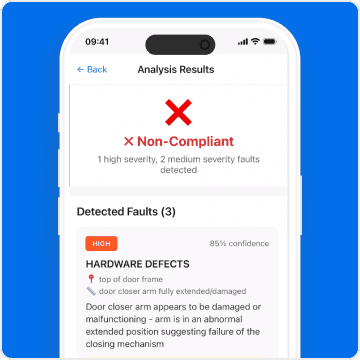
AI-powered mobile platform that automates fire door compliance inspections, transforming a slow, expensive, and inconsistent manual process into a fast, accurate, and scalable solution.
The Problem
Fire door inspection is broken. The UK has 50+ million fire doors that need inspecting 1-2 times per year. Every single one is done manually, taking 10-15 minutes per door.
I watched inspectors spend entire days in buildings, checking gaps with feeler gauges, photographing damage, writing everything down. Miss something after 30 doors? That's a compliance violation. And fire doors don't give second chances.
The Solution
We built FireDoor360 in 5 days. Take four photos of a door, AI analyses it against BS 8214:2016, get faults with severity and remediation guidance in 3 seconds.
No training data needed. Claude Vision already understood building codes through reasoning. We just had to ask properly.
What It Does
Detects door damage, excessive gaps, seal issues, hardware defects
Reduces inspection time from 15 minutes to 3 minutes per door
Generates professional PDF reports automatically
Standardizes quality across inspectors
The Real Lesson
You don't need a grand vision. You need a real problem worth solving.
Inspectors were wasting hours per building on work that should take minutes. We didn't validate a hypothesis. We built the solution to a problem we could see clearly.
7,200 lines of code in five days. Not because we're fast. Because we cut everything that wasn't essential. No fancy features. Just the job that needed doing.
Spartan Nutrition
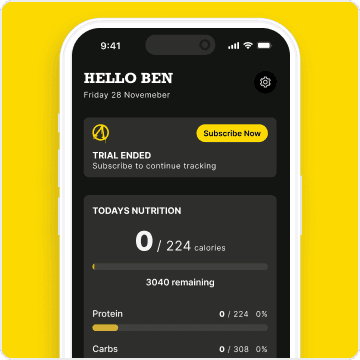
Spartan Nutrition is the AI-powered nutrition app that logs your food from photos. Just snap a picture of your meal - our AI calculates the calories instantly. No more manual tracking.
The Problem Started at My Gym
I wasn't trying to start a nutrition company. I was just trying to help my gym owner solve a problem.
He'd been recommending nutrition tracking apps to members, but they kept giving up. The apps were too complicated - weighing food, scanning barcodes, entering fifteen ingredients for one meal. It was turning nutrition tracking into a second job.
I'm a product designer, and I knew there had to be a better way.
Building It the Right Way: Fast
I didn't spend months planning. I used Precode's 5-day V1 Sprint methodology to build the first version.
The goal was simple: create nutrition tracking that actually respects people's time. No barcode scanning. No food scales. No fifteen-tap processes.
Just take a photo of what you ate or tell the app. Let AI figure out the macros and calories. See your progress. That's it.
AI as a Tool, Not a Gimmick
Here's what I've learned about building products: technology should be invisible. Nobody wants to use AI for the sake of using AI. They want to solve a problem.
The problem was clear: people want to track nutrition without it taking over their lives.
AI-powered tracking wasn't the goal - it was simply the best tool for the job. Instead of forcing you to become a data entry clerk, AI understands what you ate from a simple description or photo. Snap a picture of your meal, and the AI logs your macros and calories automatically. It does the tedious work while you focus on your goals.
What Simple Actually Means
Simple isn't easy to build. Simple means saying no to features that would complicate things.
For Spartan Nutrition, simple means:
No barcode scanning
No weighing food
No complicated logging processes
No overwhelming dashboards
Just take a photo of your meal or tell us what you ate. The AI figures out your macros, calories, and nutrition. You see your progress. Done.
Built for Consistency, Not Perfection
Spartan Nutrition won't give you perfect macros to the decimal point. That's not the goal.
The goal is consistency. Most people quit tracking not because the data isn't precise enough, but because the process is too painful.
The AI-powered tracking is accurate enough to help you reach your goals, and simple enough that you'll actually use it every day.
Why Simple Matters
You shouldn't need a PhD to track your lunch. You shouldn't need to carry a food scale everywhere. You shouldn't need to spend fifteen minutes logging what took five minutes to eat.
That's not a discipline problem. That's a software problem. And software problems can be solved.
Spartan Nutrition is my attempt at solving it. Simply and effectively for people who just want to track their nutrition without it taking over their lives.
No fluff. No complexity. Just AI-powered nutrition tracking that actually works.
Overheard
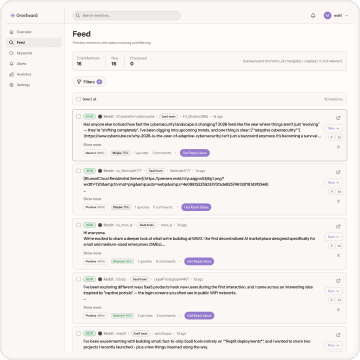
Overheard monitors Reddit and Instagram for mentions of your keywords, analyses sentiment with AI, and alerts you in real-time so you never miss an opportunity to engage.
I was losing customers and didn't even know it.
Someone on Reddit was asking about tools like mine. Perfect opportunity, right? Except I found out three days later. Three days. By then, the thread was dead and someone else had swooped in.
This happened again. And again.
So I tried the "proper" social listening tools. You know the ones. Enterprise. Dashboard with seventeen tabs. Setup wizard that takes forty-five minutes. Monthly cost that makes you wince.
They're built for brands monitoring Super Bowl campaigns, not for someone running a small SaaS with their laptop and a dream.
Here's What's Wrong With Social Listening
The big players assume you've got a team. A budget. Time to configure Boolean queries and train junior staff on their Byzantine interface.
They're optimised for quarterly reports, not for "someone just mentioned my competitor and I need to reply in the next hour."
And the pricing? Insane. You're paying for features you'll never use, data you don't need, and support for platforms that don't matter to you.
What We Actually Need
I just wanted to know when people talk about my space. That's it.
I wanted alerts I could actually act on. Not a firehose of noise. Not sentiment charts I'd ignore. Just the good stuff, filtered intelligently, delivered when it matters.
I wanted to reply quickly. Helpfully. While the conversation's still warm.
So We Built Overheard
It monitors keywords across Reddit, Twitter, and other places your customers actually hang out. AI figures out what's worth your attention and what's just noise. You get alerts. You reply (we'll even suggest responses). Done.
No setup wizards. No enterprise onboarding calls. No paying for a marketing team's worth of seats.
Here's the controversial bit: most "social listening" is just corporate vanity. Brands obsessing over mentions they can't do anything about. We built Overheard for people who actually want to have conversations, win customers, and help people.
It's social listening for builders, not boardrooms.
That's it. That's why Overheard exists.
We're opening up access soon. Join the waitlist if you're tired of missing conversations that matter.
Nattr
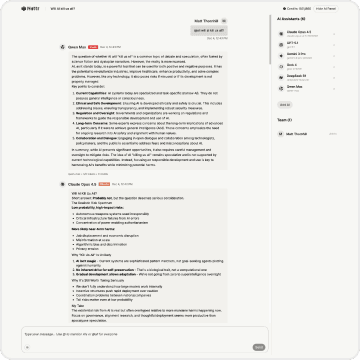
Multi-AI chat platform that lets you talk to different AI models in one interface.
Here's the thing about AI tools: they're all good at different things.
Claude's brilliant for code reviews. ChatGPT crushes research. Gemini's fast for quick questions. Grok brings the spice.
But using them meant living in browser tab hell. Copy, paste, switch, repeat. Ask the same question four times. Compare answers. Waste time.
It felt stupid.
The Aha Moment
I was debugging a gnarly function at 2am. Asked Claude. Got a solid answer. But something felt incomplete.
So I asked ChatGPT the same thing. Different perspective. Better solution.
Then it hit me: Why am I doing this manually?
What if I could just type one message and get six AI perspectives at once? Let them duke it out. Cross-validate. Challenge each other's assumptions.
That's when I started building Nattr.
Everyone's Building the Wrong Thing
The AI tool space is obsessed with wrappers. Pretty UIs around a single model. Pick your favourite, lock yourself in.
That's backwards.
The future isn't "Which AI is best?" It's "Why choose?"
Every model has blind spots. Every provider has strengths. Using just one is like hiring a consultant and refusing to get a second opinion.
One Week, Six AIs, Zero BS
We built Nattr in one weeks of intense work. No funding rounds. No pitch decks. Just us and Claude Code, building the tool we wanted to exist.
Six AI providers in one chat. Type @all and they all respond. Toggle web search on. Watch them collaborate in real-time.
Claude can be your code reviewer. ChatGPT your research assistant. Gemini your quick-answer machine. All in the same conversation.
Want the same model playing different roles? Add three Claudes with different personas. One debugs, one reviews code quality, one challenges your architecture choices.
What We Actually Built
Nattr isn't trying to be everything. It's doing one thing well: letting you use multiple AIs without the copy-paste hell.
No revolutionary AI breakthrough. No proprietary model. Just a better way to work with the tools that already exist.
Sometimes the most useful product isn't the most innovative one. It's the one that removes friction from your actual workflow.
That's Nattr. Six AIs, one conversation, zero tab-switching.
Domain Checker
Quick domain availability tool with smart suggestions for your brand name.
Why We Built Domain Checker
Last month I was helping our outbound team set up new sending domains. We needed 20 available
domains with variations of our brand name. You know, like getprecode.com, useprecode.co,
precodehq.io - the usual cold email infrastructure.
Simple task, right?
I spent three hours checking domains one by one. Copy domain name. Paste into registrar. Wait for
the "sorry, taken" message. Repeat.
That's not work. That's punishment.
So I did what any reasonable person would do: I built a tool to fix it.
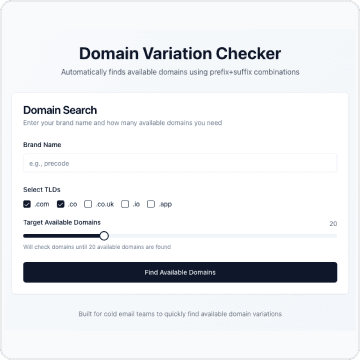
Domain Checker does one thing well. You type your brand name. You pick which TLDs you care about.
You tell it how many available domains you need. It finds them.
That's it.
No account creation. No API keys to manage. No 47-tab pricing comparison. Just type, click, get
results.
The tool keeps checking variations until it finds what you asked for. Need 20 available domains?
It'll check 50, 100, 200 if that's what it takes. You see results as they come in - no waiting for
some loading spinner to finish.
When it's done, export to CSV or copy straight to clipboard.
We could have added a million features. Saved searches. Purchase integration. Price comparison.
User accounts. All the stuff that turns simple tools into bloated software.
We didn't.
Not because we couldn't. Because the point was to solve that specific problem - finding available
domain variations without wasting your afternoon.
Cold email teams shouldn't spend their time hunting for domains. They should spend it writing
emails that help people.
We built Domain Checker so you can get back to the work that matters.